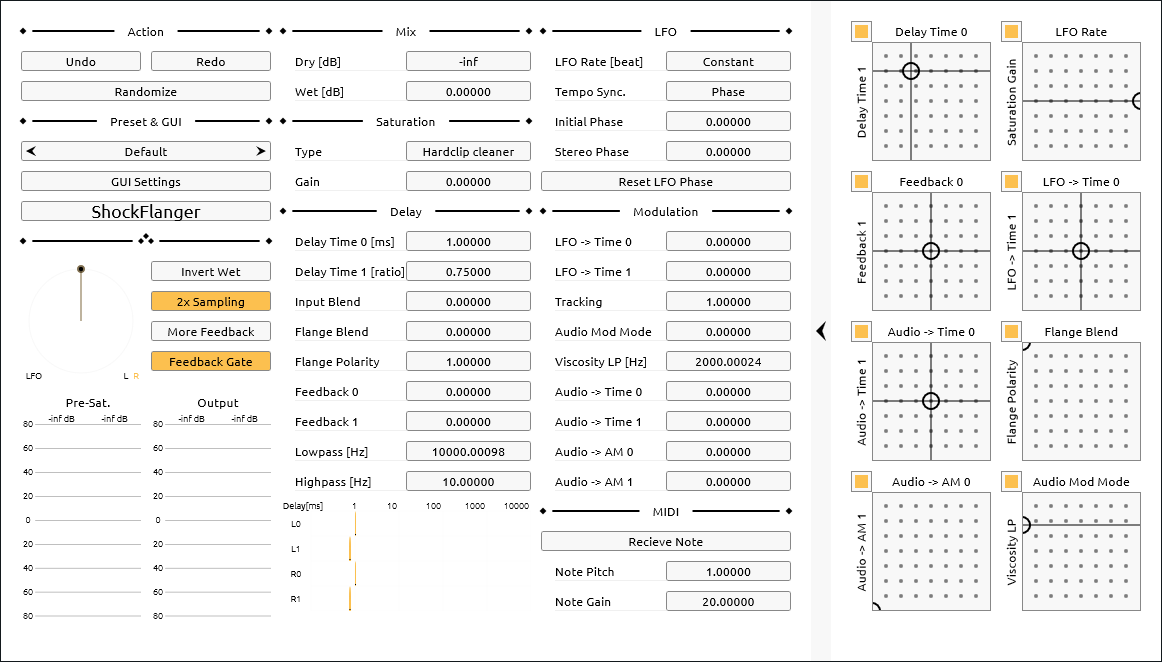
ShockFlanger is a hybrid of a distortion and a flanger. It sounds like a guitar amp. The internals are close to a through-zero flanger with saturators and waveshapers on the feedback paths. High CPU load.
Warnings
Loud output. Place a limiter after ShockFlanger.
Several options in Saturation Type may output loud spikes when combined with high Saturation Gain.
Enabling More Feedback can blow up the feedback when Feedback 0 & Feedback 1 are high.
High amounts of Audio -> Time 0 & Audio -> Time 1 may cause loud bursts.
Feedback Gate has a fixed threshold for simplicity. An external gate before ShockFlanger is advised for low S/N signals.
Quick Start
Basic recipes are shown below.
Flanger
- Raise Feedback 0, Feedback 1.
- Change Delay Time 0, Delay Time 1. 1 to 10 ms.
- Lower LFO Rate. Around 8.
- Change Flange Blend.
- Change LFO -> Time 0, LFO -> Time 1. 1 or less.
- (Optional) Lower Saturation Gain to reduce distortion.
Distortion
ShockFlanger is made to put into the effector chain shown below.
Equalizer → ShockFlanger → Equalizer → Convolver (Cabinet impulse response)
Below is a distortion recipe.
- Raise Feedback 0, Feedback 1.
- Change Delay Time 0, Delay Time 1.
- Raise Audio -> Time 0, Audio -> Time 1.
- Change Saturation Type, Saturation Gain.
Below are the parameters to adjust the character of distortion.
If the high is too noisy, drop Lowpass around 10000 Hz or lower. It may sound more natural to drop the high using external cabinet IR while reducing distortion in ShockFlanger.
Highpass is placed to control the character of distortion. It may not be able to cut out direct currents (DC), so consider using external equalizers.
Input/Output
- 1 Stereo input. (2 channel in 1 bus)
- 1 Stereo output. (2 channel in 1 bus)
- 1 MIDI or note event input.
Indicators
- Left center: LFO phases.
- Left bottom: Peak meters.
- Pre-Sat.: Pre-saturator amplitude.
- Output: Output amplitude.
- Center bottom: Delay times.
Parameters
∴ (Miscellaneous)
- Invert Wet
- Inverts polarity of wet signal.
- 2x Sampling
- Toggles 2x oversampling. Doubles CPU load and changes high.
- More Feedback
- Adds more feedback if Flange Blend is not
0.0. Use with an external gate while turning on Feedback Gate. - Feedback Gate
- Mutes delay tail when input signal drops below threshold.
Mix
Saturation
- Saturation Type
- Selects saturation algorithm.
- Saturation Gain
- Sets gain applied before saturator stage.
Delay & Feedback
- Delay Time 0
- Sets delay time for line 0 in milliseconds.
- Delay Time 1
- Sets relative delay time for line 1 as ratio of Delay Time 0.
- Input Blend
- Crossfades input signal between delay lines.
- Flange Blend
Blends internal routing:
0.0: Size 2 feedback delay network (FDN).1.0: Through-zero flanger.
- Flange Polarity
- Sets polarity of feedback on through-zero flanger path. Mixes full-wave rectified signal if it’s not exactly
-1.0or1.0.
LFO
- LFO Rate
- Sets LFO speed. Displayed in beats or Hz depending on Tempo Sync..
- Initial Phase
- Shifts starting phase of LFO.
- Stereo Phase
- Shifts phase offset between left and right LFOs.
- Reset LFO Phase
- Resets LFO to Initial Phase.
Modulation
- Tracking
- Sets LFO modulation depth for delay time of delay 1 in octaves.
- Audio Mod Mode
Crossfades audio-rate modulation source:
0.0: Saturated input signal.1.0: Viscosity-filtered feedback signal.
- Viscosity LP
- Sets lowpass cutoff frequency for audio-rate modulation source. Effective when Audio Mod Mode > 0.
- Audio -> AM 0
- Audio -> AM 1
- Sets amplitude modulation (AM) depth applied by audio-rate modulation source.
MIDI
- Receive Note
- Toggles modulations via MIDI notes.
- Note Pitch
- Scales delay time modulation from MIDI pitch.
- Note Gain
- Scales pre-saturation gain from MIDI velocity.
更新履歴
- 0.1.0
- Initial version.